Still Managing Housing Community Supports Across Spreadsheets, Emails & Paper Files?
Track referrals, authorizations, Housing Navigation, Housing Transition, Tenancy Sustaining, billing and compliance from one platform built specifically for California CalAIM providers.
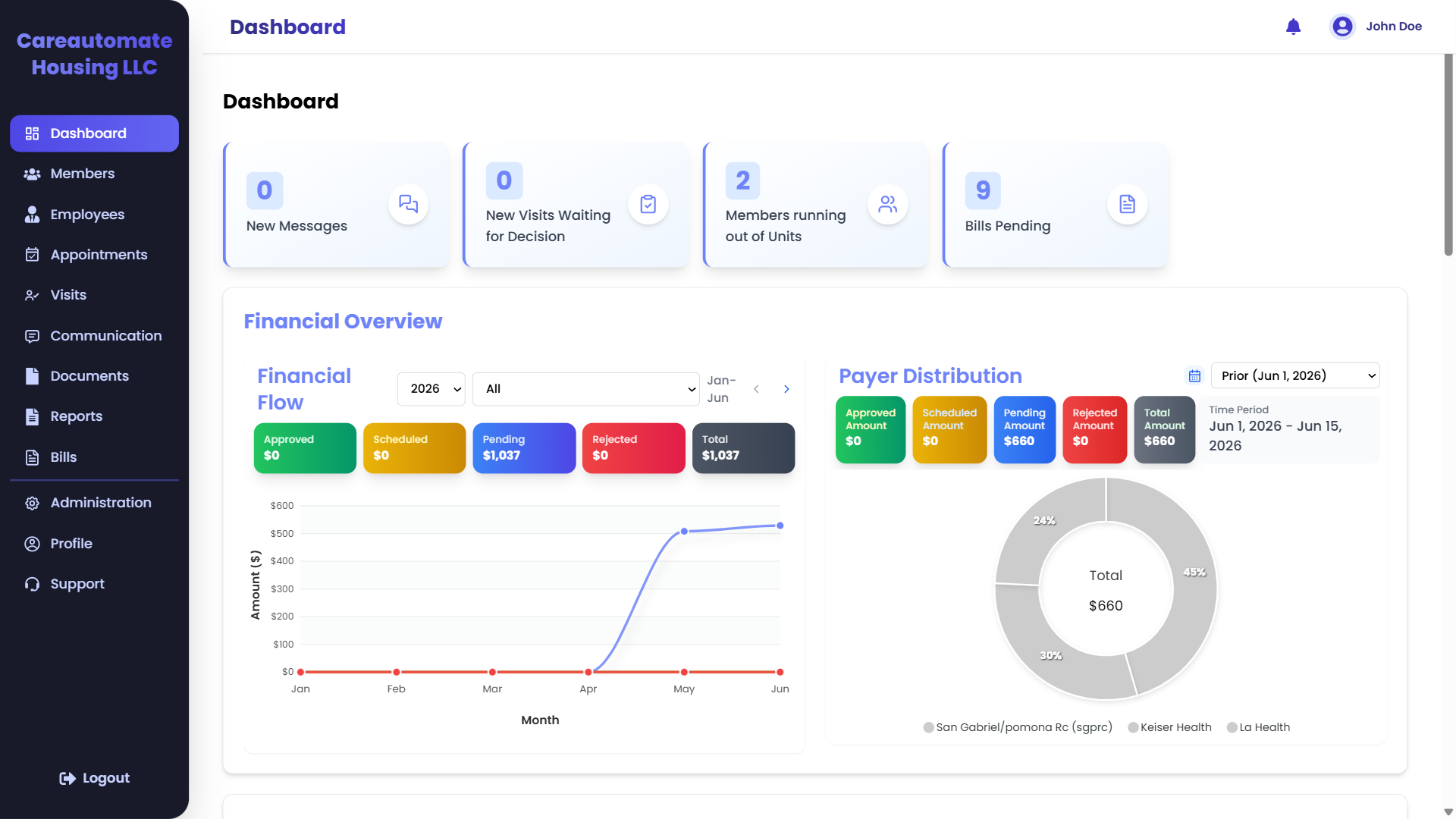
Visit Approval Queue
Track completed visits awaiting supervisor approval before claim generation.
Utilization Alerts
Automatically flag members running low on approved service units.
Pending Claims
Monitor the backlog of billing exports waiting for submission.
Financial Flow
Track approved, scheduled, pending, and rejected revenue month by month.
Revenue Forecasting
Visualize income trends over time to manage program capacity.
Payer Distribution
View funding distribution breakdown across Regional Centers and health plans.
The Questions Every Housing Community Supports Team Asks Daily
From Referral to Payment—Everything Managed in One Workflow
See how CareAutomate guides every Housing Community Supports referral through documentation, authorization tracking and billing preparation. Click any step to see what happens inside.
Click a step above to see what happens inside CareAutomate.
Purpose-Built Screens for Every Step
Every screen is built around a Housing Community Supports workflow—not adapted from generic case management software. Numbered callouts show exactly what each screen does.
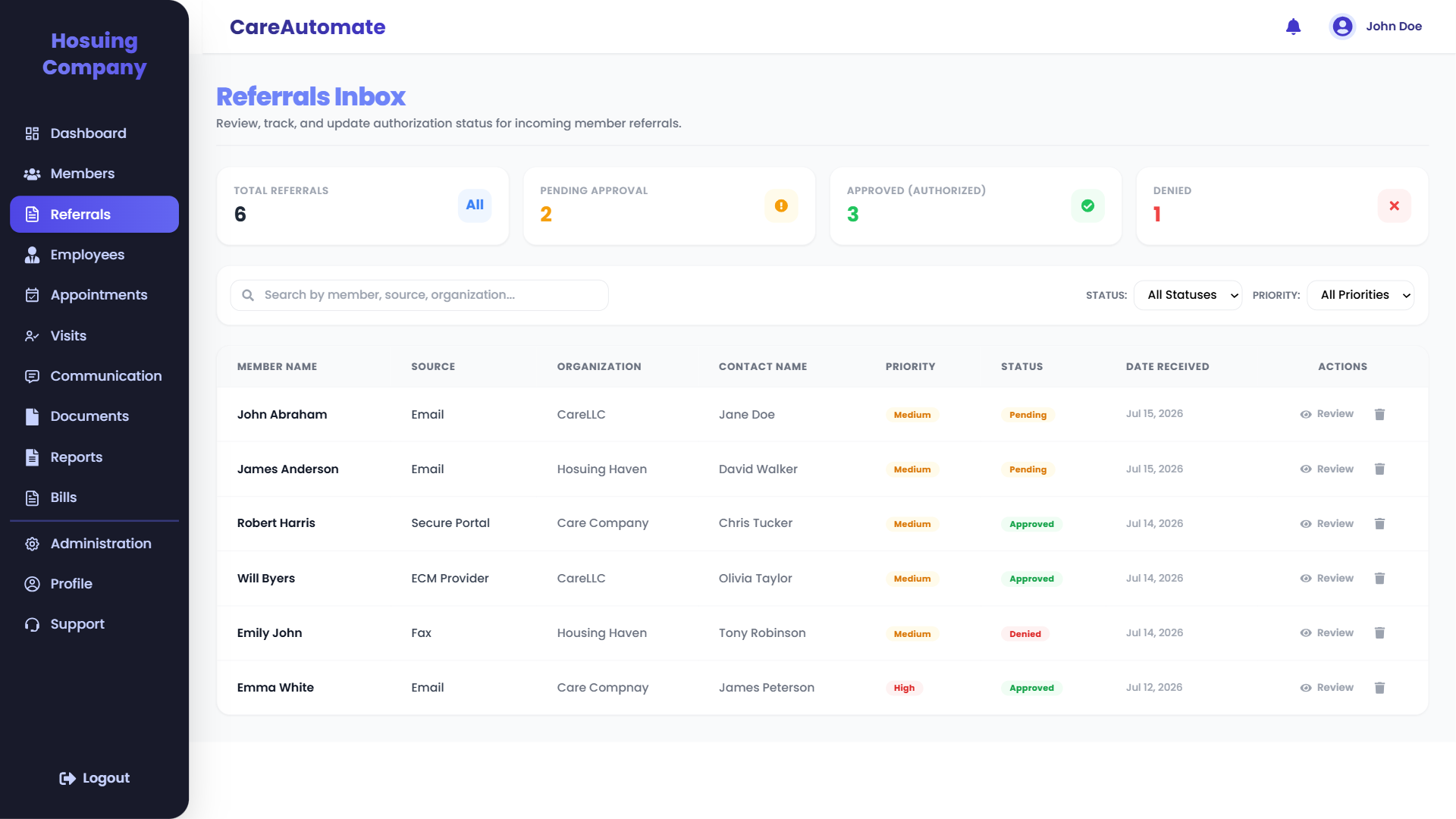
Every Referral, Tracked From Day One
See every incoming referral the moment it arrives—who it's from, who owns it, and how urgent it is.
Referral Metrics
Real-time counters for total, pending, approved, and denied referrals.
Search & Filtering
Search by member name, source, or organization, and filter by status and priority.
Referral Source
Track origin channel—whether secure portal, fax, email, or direct ECM provider.
Priority Levels
Urgency flags (Medium, High) highlight critical cases requiring immediate attention.
Authorization Status
Visual badges for Pending, Approved, and Denied statuses.
Action Queue
Quick links to review the full details or manage entries directly.
Never Lose Track of an Authorization Again
Approved units, effective dates and remaining balances—visible the moment a referral is accepted, updated automatically as services are delivered.
Approved Units
See exactly how many units were authorized.
Effective Dates
Start and end dates tracked automatically.
Remaining Units
Real-time balance as services are delivered.
Service Type & MCP
Linked to the correct plan and service code.
Renewal Alerts
Expiring authorizations flagged before they lapse.
Authorization History
A full record for every audit request.
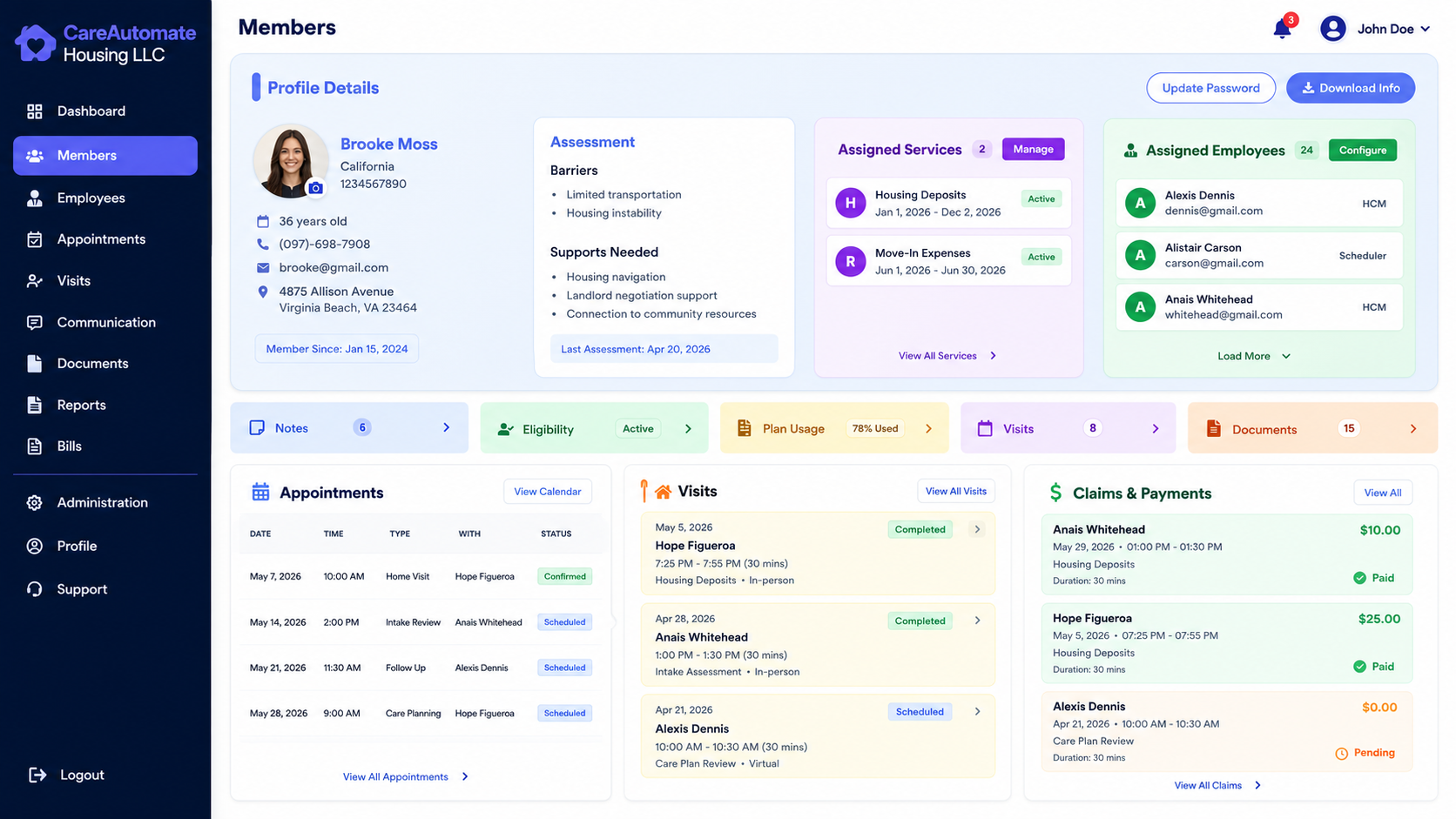
One Member Record, Everything Connected
Demographics, authorizations, documents and history—organized in a single record instead of scattered across systems.
Profile Details
Core demographic and contact info for the member.
Assessment & Barriers
Assessment data summarizing client barriers and supports needed.
Assigned Services
Track enrolled CalAIM services and active authorization dates.
Assigned Employees
View Care Team assignments and roles (HCM, Scheduler).
Quick Navigation Tabs
One-click access to notes, eligibility status, plan usage, and documents.
Recent Appointments & Visits
Schedule, check, and verify upcoming visits and historical claims.
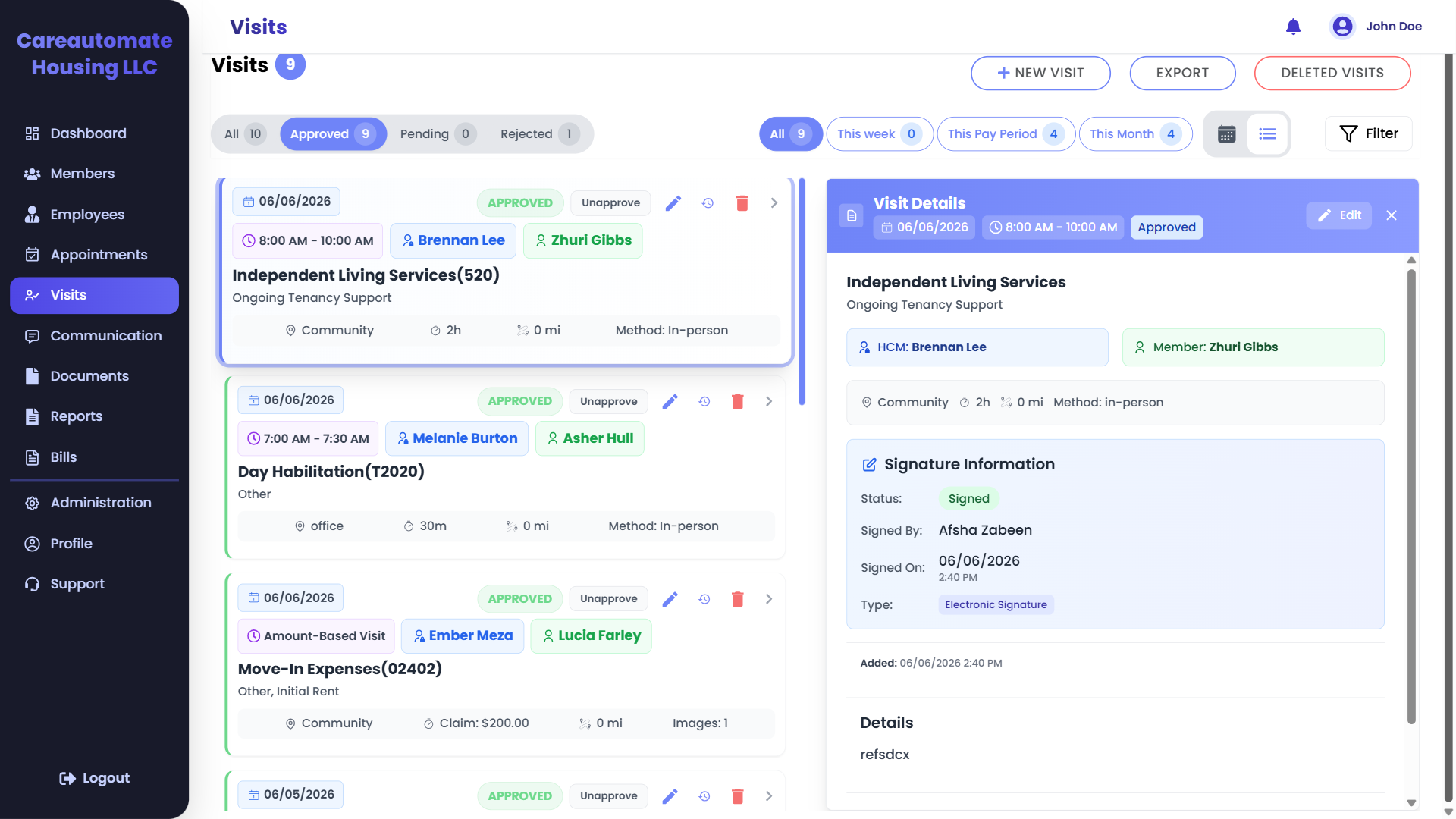
Documentation Built for the Field
Housing Navigators complete service notes on-site, with signatures and attachments captured in the moment.
Visit Queue
Review all visits logged by field navigators, showing time, staff, and client details.
CalAIM Service Codes
Service classifications like Independent Living Services (520) or Day Habilitation (T2020) are automatically tracked.
Approval Workflow
Supervisors can quickly verify and approve visits, transitioning status to Approved.
Visit Details
A comprehensive panel displaying the specific service, team member, and client profile.
E-Signature Verification
Captures and verifies electronic signatures from the client or authorized representative.
Audit Metadata
Time-stamped signature details showing who signed, when, and the verification method.
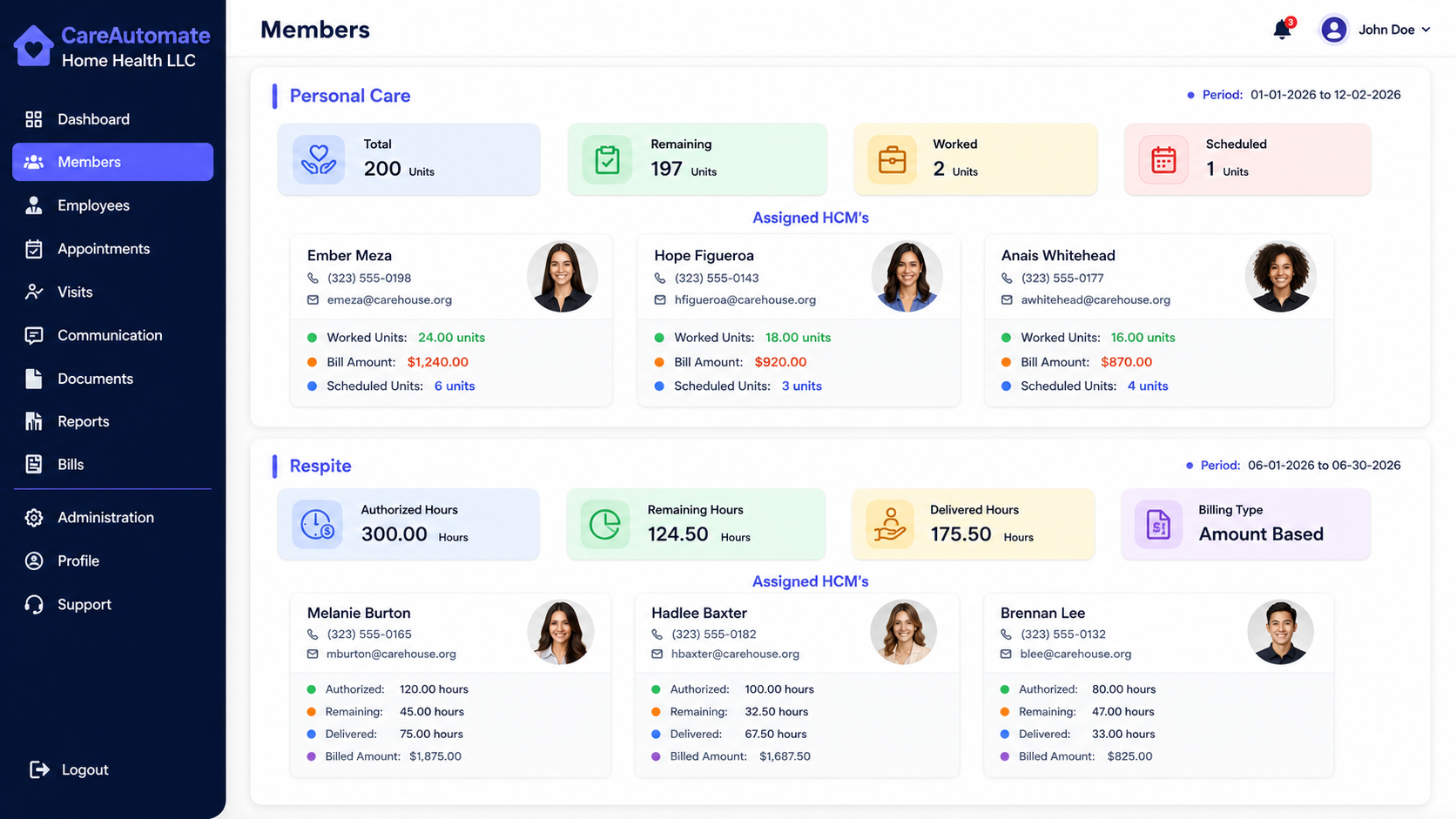
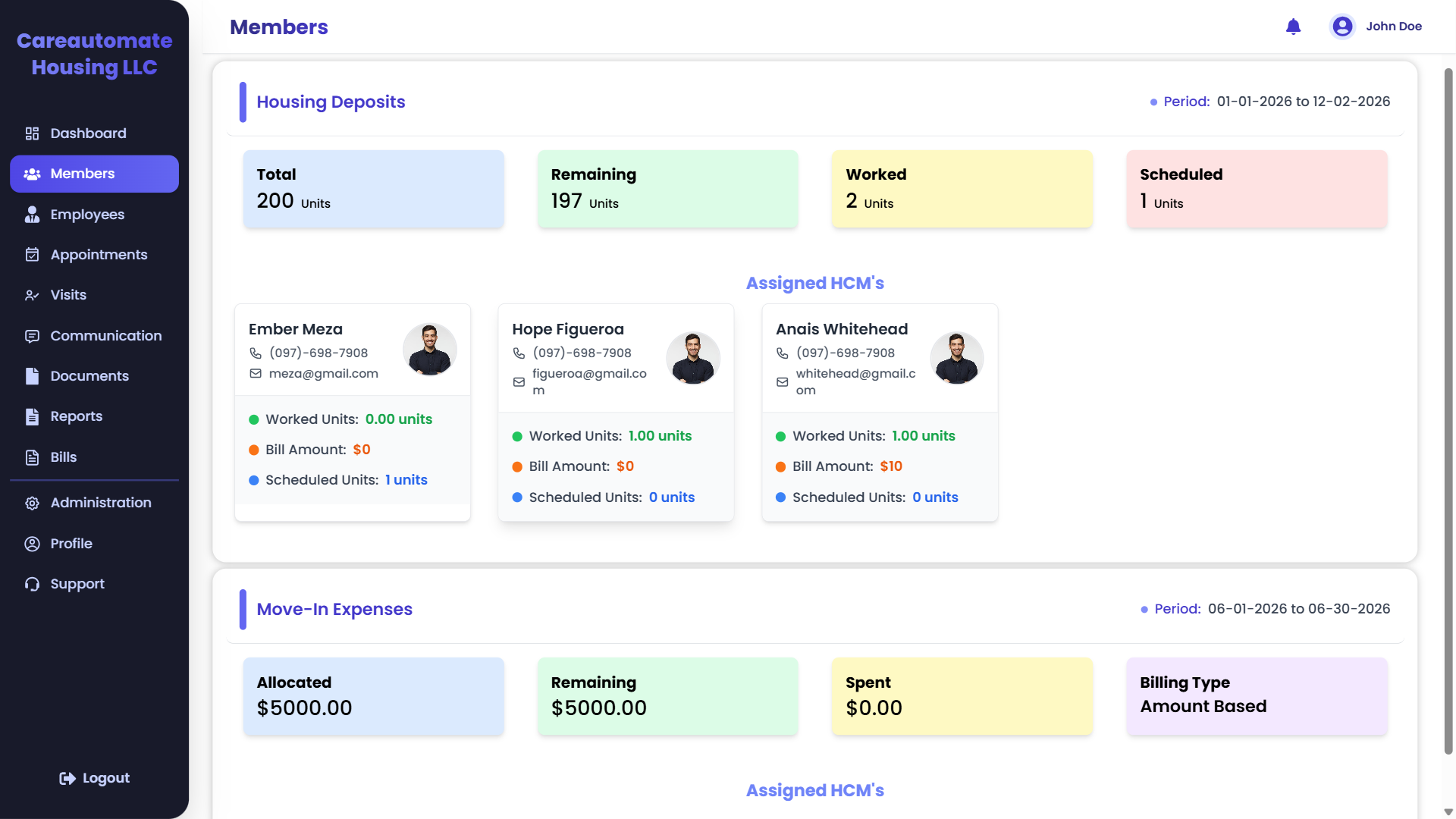
Deposits, Tracked Start to Finish
Every deposit request, landlord detail and supporting document in one view—so nothing stalls a move-in.
Authorized Units Tracking
Track total approved units and automatically calculate remaining service balances.
Scheduled vs. Worked Utilization
Monitor worked and scheduled units to prevent over-billing past authorized limits.
Assigned Case Managers
Assign multiple Housing Case Managers (HCMs) to collaborate on a client.
Staff Metrics & Billing
Track specific worked units, billable amounts, and schedules for each team member.
Move-In Expense Budgets
Manage funding allocations for security deposits, utilities, and household goods.
Amount-Based Billing Limits
Enforce caps and track remaining balances for lump-sum CalAIM funding categories.
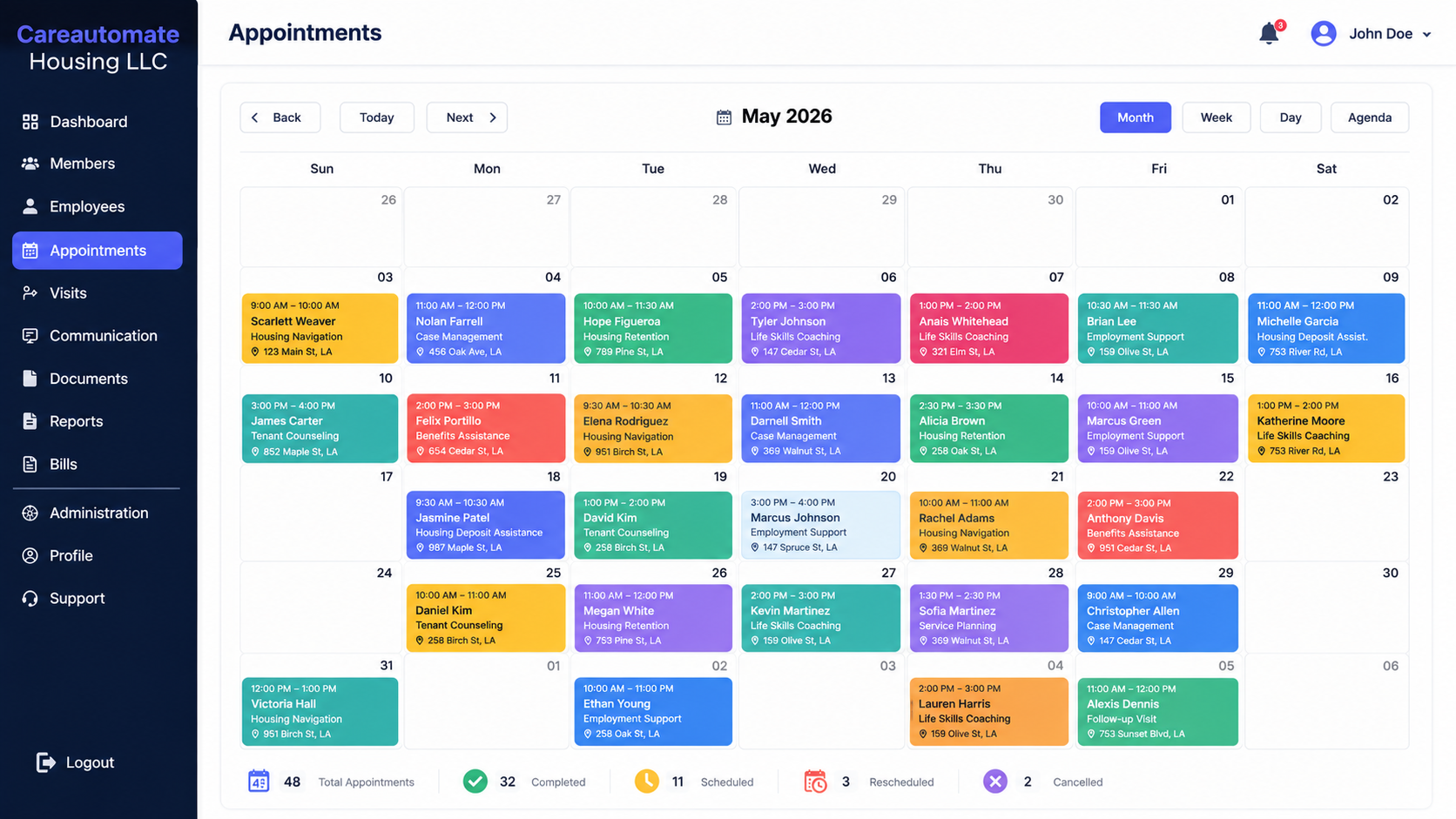
A Full Timeline of Member Progress
Follow-up visits, goals and resource referrals laid out chronologically, so sustaining services never lose momentum.
Calendar Views
Navigate easily by month, week, day, or agenda list to manage team scheduling.
Service-Specific Color Coding
Color-coded blocks distinguish service categories like Housing Navigation, Case Management, and Housing Retention.
Visit Address & Times
Each calendar block displays client location, service type, and time window for field navigators.
Total Caseload Counter
At-a-glance metrics show total appointments scheduled for the select period.
Completed Visits Tracker
Instantly view completed visits that are ready for supervisor review and progress note verification.
Cancellation & Reschedule Logs
Track cancelled or rescheduled visits to monitor client compliance and adjust navigator routes.
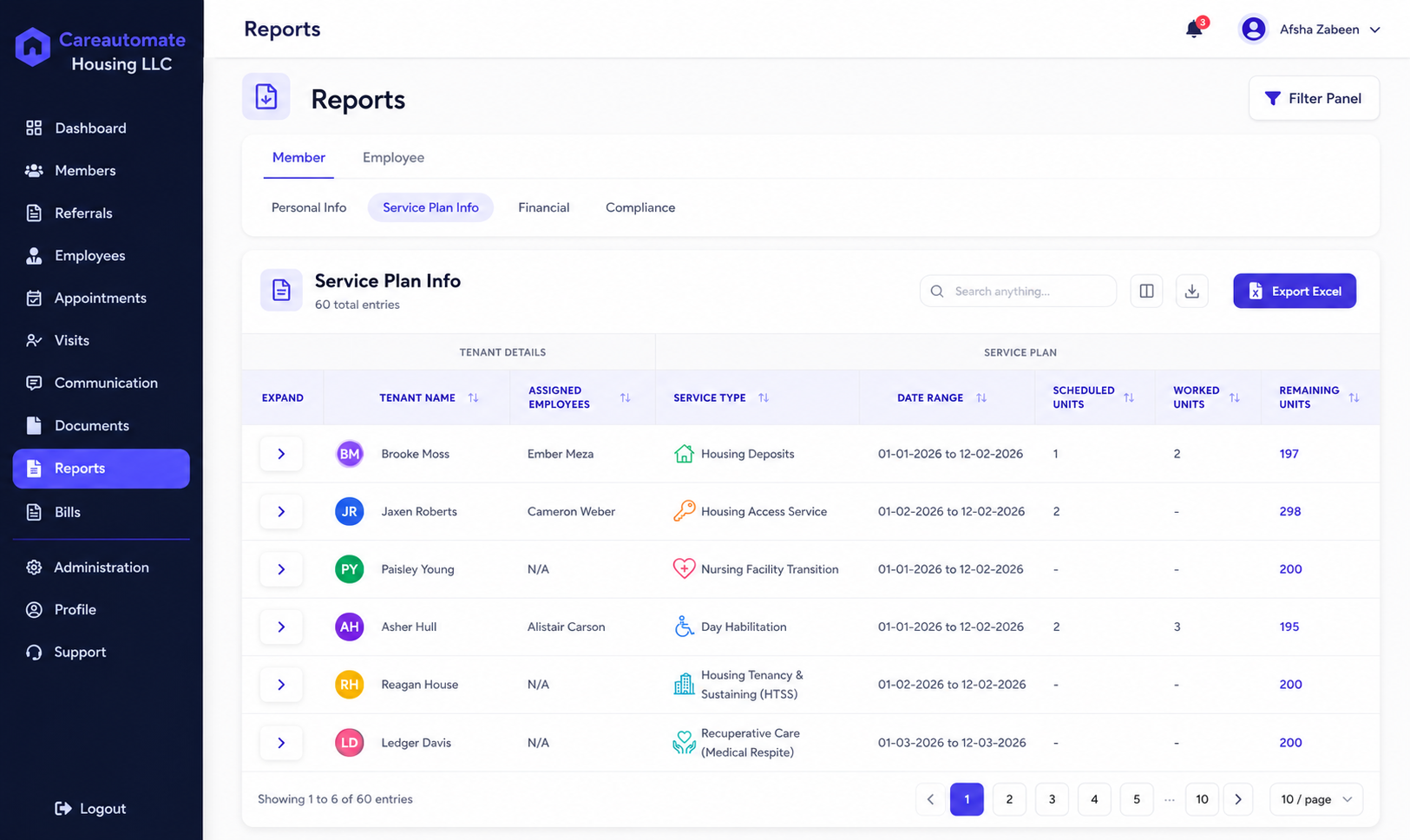
Full Visibility for Program Managers
Supervisors see staff productivity, pending reviews and caseloads in one dashboard—no chasing status updates.
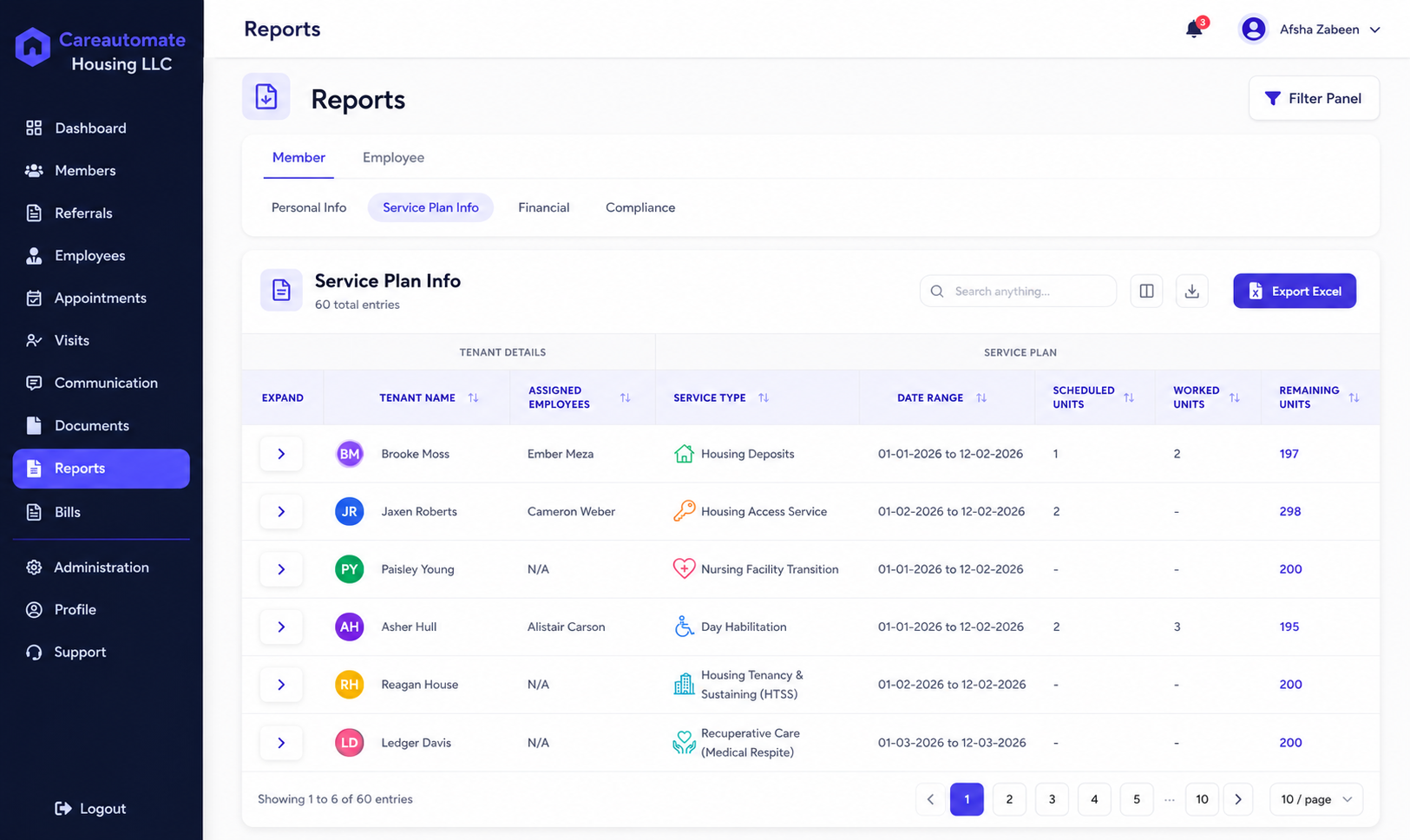
Reporting Categories
Toggle between Member and Employee views, or select subcategories like Personal Info, Service Plan Info, Financial, and Compliance.
Search & Export Tools
Filter records instantly and download reports as Excel files for funder audits or board meetings.
Client & Assigned Staff
View clients alongside their assigned Housing Case Managers to balance caseloads effectively.
CalAIM Service Profiles
Track active service types such as Housing Deposits, Recuperative Care, Day Habilitation, or Housing Tenancy.
Unit Utilization Tracking
Compare scheduled units against worked units to track service delivery and staff productivity.
Remaining Units Balances
Real-time remaining balances highlight when authorizations are near depletion, signaling renewal needs.
Reporting Leadership Can Actually Use
Referral volume, documentation completion and program outcomes—visualized for board meetings and funders alike.
Reporting Categories
Toggle between Member and Employee views, or select subcategories like Personal Info, Service Plan Info, Financial, and Compliance.
Search & Export Tools
Filter records instantly and download reports as Excel files for funder audits or board meetings.
Client & Assigned Staff
View clients alongside their assigned Housing Case Managers to balance caseloads effectively.
CalAIM Service Profiles
Track active service types such as Housing Deposits, Recuperative Care, Day Habilitation, or Housing Tenancy.
Unit Utilization Tracking
Compare scheduled units against worked units to track service delivery and staff productivity.
Remaining Units Balances
Real-time remaining balances highlight when authorizations are near depletion, signaling renewal needs.
Billing-Ready Records, Automatically Sorted
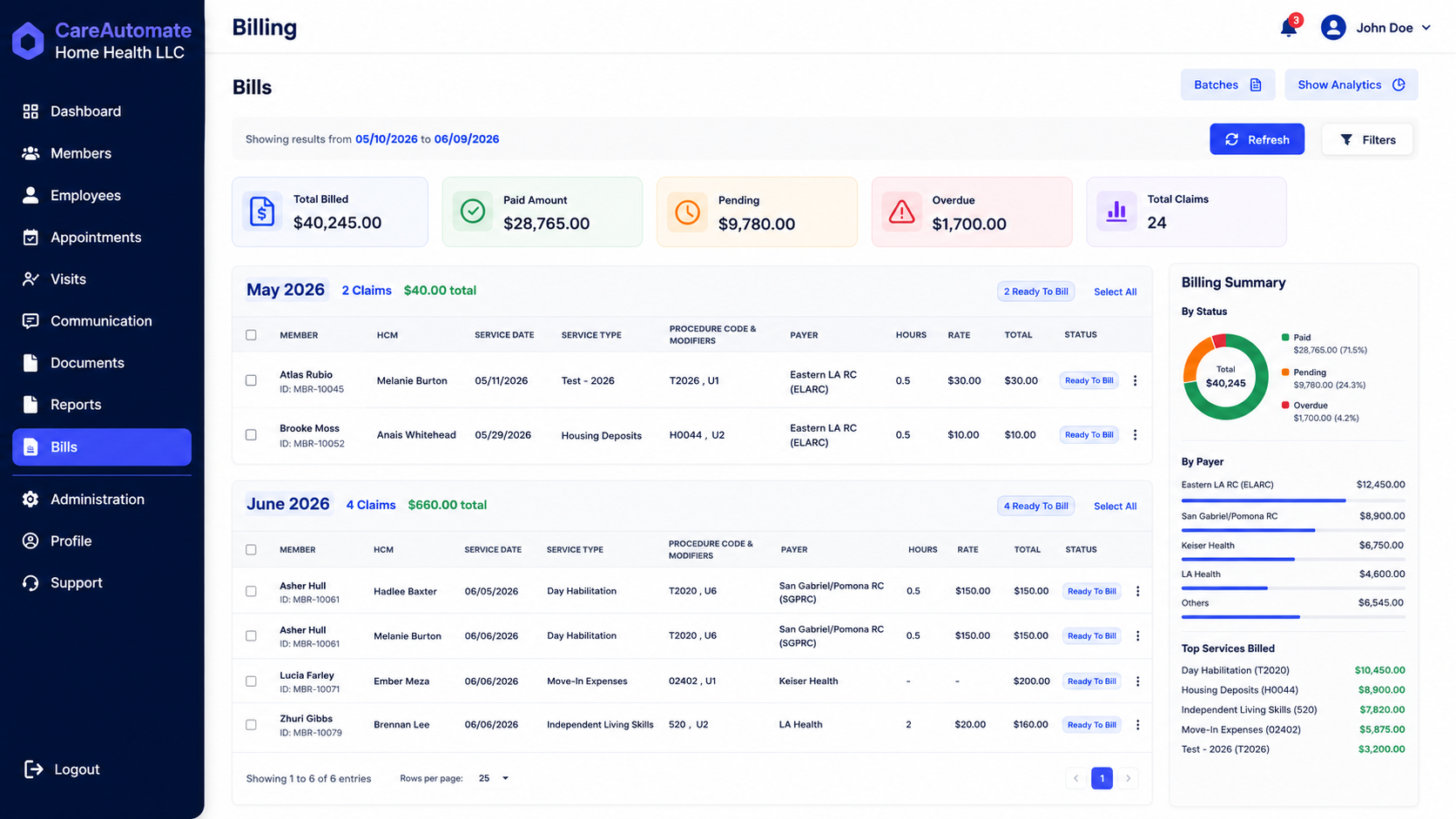
Completed, documented visits flow straight into a billing queue—separated from anything still missing information.
Financial Overview
Real-time tracking of total billed, paid, pending, and overdue amounts.
Total Claims Generated
Counters show the total number of claims generated in the select period.
Chronological Groups
Claims are automatically grouped and subtotaled by month.
Billing Readiness
Claims are flagged as "Ready To Bill" once visit logs and signatures are complete.
Billing Summary Status
Breakdown of claims by paid, pending, or overdue status.
Payer Revenue Distribution
Track billing revenue distribution across different regional centers and health plans.
Everything Field Staff Need, On Their Phone
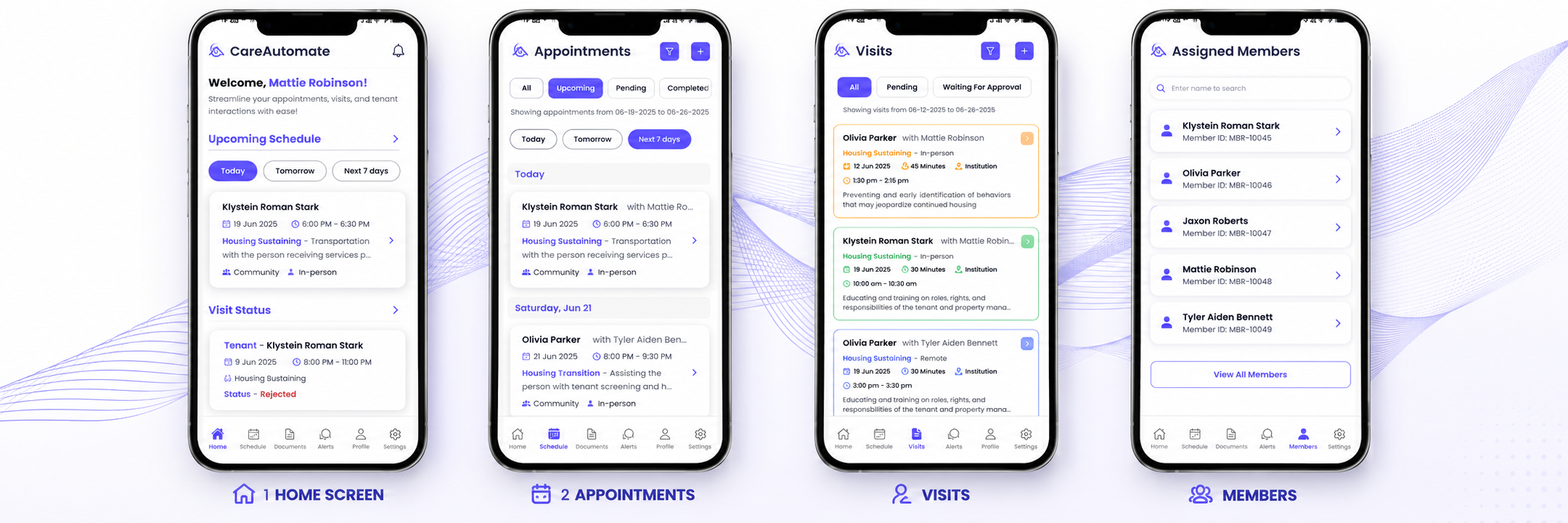
Housing Navigators complete documentation, capture signatures, log GPS visit check-ins and upload photos—right from the field.
Home Screen Dashboard
Welcome summary, quick schedule snapshot, and today's visit status.
Appointments Calendar
Filter scheduled appointments for today, tomorrow, or the next 7 days.
Visits Queue
Real-time list of all completed, pending, and approved visits.
GPS Visit Tracking
Logs check-in locations and travel distance to ensure audit compliance.
Assigned Members
View the entire assigned caseload and search member files on-site.
Field Notes & Uploads
Complete progress notes, capture electronic signatures, and attach photos from any device.
See Everything Happening Today
A real-time snapshot of referrals, authorizations, documentation and billing—built for Program Managers and Executive Directors.
Everything Your Team Needs
One connected platform, built specifically around the Housing Community Supports workflow.
Referral Management
Track every incoming referral.
Authorization Tracking
Monitor approved units.
Documentation
Field staff complete notes.
Scheduling
Assign Housing Navigators.
Billing Queue
Prepare claims.
Compliance
Audit-ready documentation.
Built for every role—from Executive Directors to Billing Teams
Built for Every Housing Community Supports Service
Configured for the services California MCPs and providers deliver today.
Housing Transition Navigation
Housing Deposits
Housing Tenancy & Sustaining
Recuperative Care
Personal Homemaker
Respite
Day Habilitation
Environmental Accessibility
Nursing Facility Transition
Works With Members Across California's Major MCPs
Documentation and authorization tracking support members enrolled across California's Medi-Cal managed care plans.
From Referral to Billing—in One Day
A realistic look at how a single referral moves through CareAutomate.
Manual Process vs. CareAutomate
The same nine things every Housing Community Supports team tracks—side by side.
| Manual Process | CareAutomate | |
|---|---|---|
| Referral Tracking | Spreadsheets & email | Built in, real-time |
| Authorization Tracking | Spreadsheets & email | Built in, real-time |
| Member Timeline | Spreadsheets & email | Built in, real-time |
| Case Notes | Spreadsheets & email | Built in, real-time |
| Housing Progress | Spreadsheets & email | Built in, real-time |
| Billing Preparation | Spreadsheets & email | Built in, real-time |
| Audit Reports | Spreadsheets & email | Built in, real-time |
| Task Management | Spreadsheets & email | Built in, real-time |
| Supervisor Dashboard | Spreadsheets & email | Built in, real-time |
Why Community Supports Providers Choose CareAutomate
Centralize Referrals & Records
One system of record instead of five disconnected ones.
Reduce Duplicate Documentation
Enter information once; it flows everywhere it's needed.
Improve Team Collaboration
Navigators, supervisors and billing work from the same record.
Increase Leadership Visibility
Real-time dashboards replace end-of-month guesswork.
Standardize Workflows
Every referral follows the same, repeatable process.
Prepare Billing-Ready Records
Documentation gaps are caught before they delay payment.
Housing Community Supports providers were being asked to manage referrals, authorizations, field documentation and CalAIM billing using tools built for entirely different programs—or no connected system at all. CareAutomate was built by talking directly with Housing Navigators, Program Managers and billing teams about where spreadsheets and disconnected systems were costing them the most time and the most revenue.
Making the Switch Is Simpler Than You Think
Most providers are fully live—data migrated, staff trained—within a few weeks.
Workflow Planning
A personalized implementation plan built around how your team already works.
Data Migration
Your existing referrals, members and records imported for you.
Staff Training
Hands-on training for Navigators, supervisors and billing staff.
Go-Live & Support
Ongoing support after launch—not just during onboarding.
Questions California Providers Ask
Yes. CareAutomate is purpose-built around California Housing Community Supports workflows, not adapted from generic home health or hospice software.
Housing Transition Navigation, Housing Deposits, Housing Tenancy & Sustaining, Recuperative Care, and related CalAIM Community Supports services.
Yes. Program Managers, Housing Navigators, Supervisors and Billing teams all work from the same referral record in real time.
Yes. Field staff can complete case notes, capture signatures and attach photos directly from a mobile device.
Yes. Supervisors review notes, return incomplete documentation, and approve visits before they enter the billing queue.
Yes. Approved, documented visits flow automatically into a billing queue with remaining units and missing documentation flagged.
Yes. Implementation includes a personalized data import from your current spreadsheets or systems.
Most providers are live within a few weeks, including workflow configuration, staff training and go-live support.
Yes. A member can be enrolled in multiple services—such as Housing Transition Navigation and Housing Deposits—with each tracked separately against its own authorization.
Yes. Remaining units update automatically as services are delivered and documented, so nothing is billed past what's approved.
Yes. Assessment and intake forms can be configured around your program's specific workflow and requirements.
Yes. Program Managers and Supervisors see visit status, documentation and caseloads as field staff complete them.
Billing-ready records are organized and exportable, so your billing team can prepare and submit claims without re-entering data.
Documentation, signatures, authorizations and service history are organized in one auditable trail for every member and every visit.
Simple Pricing, Built Around Your Program
Every plan includes referral management, documentation, authorization tracking and billing readiness.
Essentials
For small teams starting to move off spreadsheets.
- Referral management
- Member profiles
- Mobile documentation
- Basic reporting
Professional
For growing programs managing multiple services.
- Everything in Essentials
- Authorization tracking
- Supervisor review workflow
- Billing queue
Organization
For multi-site providers with complex reporting needs.
- Everything in Professional
- Custom reporting & dashboards
- Role-based access
- Dedicated onboarding
See Your Referral-to-Billing Workflow, Live
A 20-minute walkthrough tailored to how your team already works.
Book Workflow ReviewSee Referral to Billing Workflow